> Because, for one thing, "one" sometimes doesn't have the computer science degree and years of experience to even begin to understand Git, for one thing.
With respect, I call shenanigans on this my good friend.
I dropped out of highschool and attended no postsecondary and I don't have any problems with Git. I started with the basics and read more as I got myself into tighter and tighter jams.
I feel like this myth is perpetuated by a small group of people who are very vocal about "git is hard". If git commit and git checkout are too complicated, I don't know what else to say except that every VCS has those concepts, perhaps you're just used to those systems instead.
> I dropped out of highschool and attended no postsecondary and I don't have any problems with Git. I started with the basics and read more as I got myself into tighter and tighter jams.
I think you may be underestimating the wideness of audience that this may appeal to. I was thinking of introducing my rather older Dad who knows nothing about CS/programming to version control and plaintext. He is an accountant, and currently uses the "File_Copy_1.docx" method of version control, even for simple documents that could just be handled by plaintext.
I would prefer that he avoid the confusion of git, where `git checkout [X]` can refer to [X] being a branch, commit, or file.. This new basic RCS may be good in that regard. I guess another option might be Legit (http://git-legit.org).
> I dropped out of highschool and attended no postsecondary and I don't have any problems with Git.
Git problems arise when people want to do moderately sophisticated things, beyond just committing changes and viewing logs and diffs.
> If git commit and git checkout are too complicated,
If "If git commit and git checkout are too complicated" is your argument, then you aren't doing anything more sophisticated with git than what you learned from a svn to git migration tutorial in five minutes.
People do more with version control than "commit and forget".
If that's all you need, then what you really want is backup software that takes regular snapshots of your filesystem.
I think you may have misunderstood my comment, of course there is more to it then checkout and commit.
Those are the basics, that's where you start. Then you get stuck somehow, and you read more. That's what I did at least.
IMO It's about not giving yourself the impression that the learning curve is insurmountable, you can do it. Starting with the basics and growing up is, I thought, common knowledge for acquiring a new skill.
I find when I get confused and flustered with git, every single time it's because I don't understand [yet] how I got into the current state. I've found that if I take a breath, put the problem aside and focus on figuring out how I got into that broken state, then the solution reveals itself -- not once have I ever lost code as a result of git confusion.
I perfectly understand that there are hordes of programmers for whom messing around with git is far more interesting than the actual code they are working on.
"Man, I just interactively rebased my last six changes so the commits are in a different order, and two of them were squashed into one! Boy, does that feel productive."
> It's about not giving yourself the impression that the learning curve is insurmountable, you can do it
Perhaps I can, but with mercurial around I dont see why I need to. I think no one in their right mind claims git cannot be grokked. They question whether that effort is well spent given there are equally effective alternatives that people find simpler to use.
Other than github I fail to see a compelling reason going for git apart for the linux kernel development workflow of course. Its not a bad tool but not quite the "you possibly cannot and should not do without it" that it is made out to be.
That comment goes out of its way to make things seem complicated. The different synonyms for things are confusing, and are evidence of the fact that Git has evolved over time rather than springing forth fully formed.
That said, the staging area is one of the most useful features of Git, and if you don't want to use it, you can largely ignore it. The staging area allows me to make a few simple changes in the order that they occur to me, but add and commit them (using git add -p) in the order that makes the most sense for code review.
Also: I highly recommend setting up shell aliases for the most commonly used commands, whether you use Git or anything else. "gco" is much faster to type than "git checkout", etc.
> The staging area allows me to make a few simple changes in the order that they occur to me, but add and commit them (using git add -p) in the order that makes the most sense for code review.
Ah, but note that "git commit" also takes a "--patch" argument. So the add-and-commit case you are describing can in fact be done in one step. That step uses the index, but only for its implementation; you're not aware of it. "git commit --patch ..." appears to move selected changes from the working copy straight to a new commit on HEAD. The command could be implemented in a version of git that doesn't have an index.
Those little commits you make in preparation for review are your true staging area.
git commit and git checkout are fine. git pull and git push are where the problems start.
as I got myself into tighter and tighter jams
I suppose this is the thing; if you're happy to learn that way, fine. It's just that git is particularly prone to "I've trashed local state and lost work" / "I've just pushed a huge mess and will have to lose time cleaning it up, if that's even possible".
I love git, but even git checkout is asinine. It's fine for checking out a tag/branch/rev/treeish, but why on earth does it also revert files to their checked in state if given a path argument?
I don't think git should be prone to trashing local state due to how it usually yells at you when it's about to do that, but then I've been working with a student this quarter who seems to do that every time I push something to github and she needs to pull. I think if the git community got together, did a usability study on how people actually use git, and renamed/split out commands into names that made sense, it would be a huge boon for general usability.
> why on earth does it also revert files to their checked in state if given a path argument
Simplification! :) "git checkout file" reverts a file from the index. If it doesn't exist in the index, then from HEAD.
The problem is that you can make a typo, because branches, tags and files are all in the same namespace. Suppose you wanted to type "git checkout foob" which is a tag or branch, but instead you make a mistake and type "git checkout foom" which is the name of a file that happens to have unstaged changes. Oops!
If "file" has unstaged changes, then "git checkout file" should rename it out of the way first to "file.#1#" or whatever. (Hello, look at CVS!)
Learning by mistake is one of the quickest ways to learn something though. Personally, to mitigate the possibility of losing my hard work to this problem, I started using git for personal projects and didn't use it for my important work until I was comfortable with it (eg had run into several problems, but resolved all of them).
This also helped me understand Git well enough to teach it to my colleagues (and in teaching others, you learn even more yourself), and now that everyone on my team is comfortable with it we've switched to it almost exclusively.
I think git hard a small but steep learning curve. Lots of developers aren't used to using the command line anymore so git can seem 'scary'. Personally I gave up on git a couple of times before finally learning it but as a developer working by myself I also couldn't understand the need for version control (at the time) so giving up wasn't a big deal. I think once you give it a couple of hours of your time you can understand enough to use it in most situations. Plus the GUI tools (SourceTree for example) are quite good.
Nah, it's not _that_ bad. Only way one may realize Git is hard is to compare it with other DVCSes, so avoiding that makes him confident enough to spread wishful speculations of it's something is wrong with people, not Git.
I would say, git isn't harder than any other distributed vcs. However, its tooling leaves a lot to be desired: its terminology is non-obvious and requires sifting through dense man pages (or dense reference books), it's hugely inconsistent (e.g. git remote rename vs git branch -m), and rebasing and merging can create confusing messes for users to sift through.
DVCS is hard. Git is hard. They're hard for very different reasons.
With a centralised VCS, you have two 'version's of the file system: your local working copy, and the current branch in central repository. That leaves limited room for inconsistencies between the versions that might confuse the user / need conflict resolution.
Logical versions = Number of working copies + Number of branches
With a distributed VCS, you necessarily add a third 'version' (current branch in local repository). That's unavoidable.
Logical versions = Number of working copies + Number of local branches (over all working copies) + Number of branches in central repository.
But git is considerable worse: with git checkout working with a central repository, there's at least 5 versions involved, all of which may differ: working copy, index, local branch in local repo, remote branch in local repo, branch in remote repo.
Different commands affect different 'versions', so it's easy for new users to get them into an inconsistent state, and pretty much impossible for them to recover: usually they can't identify the reason for their trouble because they do not distinguish between these 5 'versions' mentally.
It's impossible to build good tooling on top of this mess, unless your tooling completely hides these extra 'versions' from the user by always keeping them consistent with some other 'version'.
For example, a commit tool might use the stash only during the commit itself, so stash and local working copy are always kept consistent. Unless the user also uses the git command-line client...
Of course, git is also hard due to the inconsistencies in the command line interface, but that's in addition to this fundamental unnecessarily complexity.
    git init                       # make a local repo
    git add foo.txt                # add the file
    [edit]
    git add -u                     # add changes to commit
    git commit -m"made a change"   # check in changes
    git log                        # see commits
    git status                     # what has changed
What you need to know is that "git add" has little to do with "foo add" where "foo" is just about any other version control system. Look, you ran "git add" on files that were already added, what?
There is this hidden thing called the index that confuses the heck out of everyone. Oh, but it's not always called the index, either: that would be unnecessarily easy. Sometimes it is called "the cache". How to show the difference between the index and HEAD? Why, of course not "git diff --index" but "git diff --cached".
(In what way the index acts as a cache is beyond me; a cache is a fast place where you look for something that is also available in some slower place, but things in the index are sometimes only in the index and nowhere else!)
Furthermore, things in the index are not "indexed" or "cached". Why, they are "staged". So why don't they call it the stage? (And only that: no synonyms?)
(The index behaves like a cache in the following sense: it has transparent "read through". If you do a "git diff", you see the difference between the index and your working copy for any changed file. But if the index doesn't have that file, then it gets out of the way and you see the diff between HEAD and the working copy. This confuses people because the transparent behavior teaches them, most of the tiem, that "git diff" is like "svn diff" when it isn't.)
The overloaded meanings of "git reset" are astonishing also. Sometimes it means "make the working tree like what is in HEAD". Sometimes it means "no, don't touch the working tree, but change HEAD to a particular revision". Sometimes it means "don't touch HEAD or the working tree: make the index look like a particular revision".
Want interactivity? Sometimes it's --interactive, and sometimes it's --patch. Please, just let me do "git stash --interactive"; don't make me correct that to "--patch".
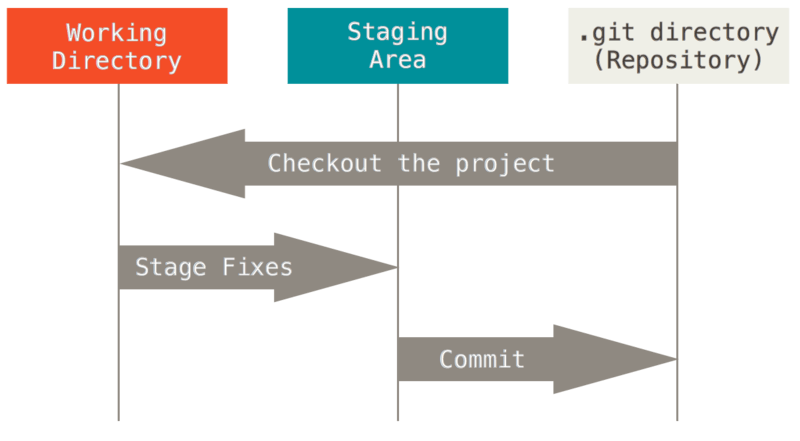
You do have some very valid points, and git can be confusing. I wonder if those points are more confusing for someone coming to git from some other VCS than someone using git as their first VCS. My 13 year old son got the idea of Git after seeing a diagram like this:
You beat me to it. RCS can't scale up like Git, but Git scales down very nicely. Instead of learning two VCSes, you can reuse the same one you probably already use for everything else.
Sure, Git isn't the last word in VCS. There's lots of room for innovation in the space. Still, I don't see anything in the docs (at http://www.catb.org/~esr/src/src.html) that Git can't do just as well. It seems to be a solution in need of a problem.
That's what I do on my "bin" directories (for scripts and such).
On the other hand, maybe being able to grab something analogous to a ",v" file and moving the archive for a single file around by itself has some value. Just not enough value for me to bother installing RCS when git is already present :-)
Sure, I sometimes try things that don't work, and I can just revert my changes. I'm just used to having everything in source control, so I even like it for one-off stuff that doesn't fit in an existing repo.
This is a wasteful step; you can commit all your changes with "git commit -a" which adds the modified files to the index, and commits, in one step.
The index is a completely pointless idea in git that has no purpose; the next major version of git should factor it out. Git would really improve if it lost the index thing.
You're already using distributed version control where you can have a whole swath of commits which are not published to your upstream. That is all the staging area you need; you don't need a staging area before your staging area. There are just too many levels: working copy to index. Index to commit. Commit to upstream repo.
Git tries to hide the index from users, but that backfires when awareness of its semantics crops up in corner cases. For instance, quite stupidly, if you try to revert a file from a prior commit with "git reset <sha> <file>", it does it in the index rather than where you expect, namely the working copy (that being left untouched). This is a purposeless complication. Now you have a "git diff" which looks like the change is being added rather than subtracted (because that's actually the delta from the index to the unmodified working copy), and a "git diff --cached" which is exactly its opposite (because it's a delta from HEAD to the index).
There has to be a concept of modified state which extends to "this new file is scheduled for addition" or "this file is scheduled for deletion". That's all the "index" you need. Other than that, there should only be the working tree, and whatever is in HEAD.
Git has the tools that let you make multiple commits and squash them together into one, so the index is completely redundant from that point of view. Instead of
  hack file
  git add file
  hack file
  git add file # squash into previous index entry
you can easily do
  hack file
  git commit file  # pretend the index doesn't even exist
  hack file
  git commit file
and then do an interactive rebase where you squash those commits together.
This is actually cleaner because you're not doing "squash as you go" into the staging area, but making actual commits where the changes are tracked and separated. Maybe you will end up not wanting to squash them into a single change!
I.e. since commits can be amended, cherry picked and squashed to your heart's content, there is no need for the software to support workflow involving a staging area where you prepare the perfect commit. It is superfluous.
The index smells like a left over from some early prototyped version of the software, before the full concept was hammered out, which was then difficult to remove (or it never occurred to anyone).
Ugh, this is terrible, the index is git's best feature. I kind of see where you're coming from with the idea of squashing together commits before pushing but it seems like a lot of awkwardness and overhead for the really basic use case of committing a bunch of files without doing it all in one command. Maybe it's just my OCD tendencies but I actually do spend time crafting the perfect commit, picking only the hunks/lines that matter and all that.
I think if people are taught git focusing on the index/staging area, it makes a lot more sense and you have much fewer problems.
You can pick out the hunks and lines that matter using "git commit --patch". This does the "git add --patch" and "git commit" in one step, so you never see any index.
Face it, the git index is an exaust manifold bolted on to a bicycle. This can be proven. Any argument you make for how the git index is useful is easily knocked down with a counterargument which shows how it it is redundant, because existing mechanisms uniformly handle that case.
Moreover, the index can be shown to complicate git. For instance when viewing differences with "git diff" you have: index to working ("git diff"), HEAD to index ("git diff --cached") or HEAD to working ("git diff HEAD"). This cruft all goes away if there is no index: you can just have "git diff" for the usual case of "show me what's different between the branch and working copy", like in virtually every other revision control system on the planet.
> I think if people are taught git focusing on the index/staging area, it makes a lot more sense and you have much fewer problems.
Absolutely no disagreement there. The index is there (complaining won't make it go away), and you have to know about it, otherwise you will not understand what is going on in some situations. People learning git must learn about the index upfront and know things such as "git diff" diffing against the index, or that the successful parts of a merge are in the index whereas the conflicts are unstaged and things of that sort.
Git is one of those things where it pays off immensely to understand the underlying object model.
Learn about commit objects, tree objects, and file blobs. Then learn about the staging area.
There are some things layered on top of or next to this (such as stashing, pull and push), but understanding this small core is sufficient for everything else. I've worked on large problems and juggled many branches, and I've never had any problems.
Git gets the core concepts of distributed version control right, and this is the reason why it has won. Over time, everybody will be exposed to those core concepts, and the age of cutting and pasting command line recipes from the web will be over.
Once I read that git's core model is a DAC abs everything is just a label to nodes on the graph, I haven't had any issues using git. Before that, it was a bit of a mystery.
> computer science degree and years of experience to even begin to understand Git, for one thing.
Unless you're programming, in which case you should be able to understand git well enough, there are plenty of tools which completely abstract away the CLI interface (GitHub's is great).
So, "when I need something easier to use" would be your primary use case for this? Which would mean that for someone that knows git reasonably well already, they would have no use case for this software? After all, learning a wholly new tool is harder than using a tool you already know.


Because, for one thing, "one" sometimes doesn't have the computer science degree and years of experience to even begin to understand Git.
For many users, using Git means cutting and pasting command line recipes scoured from desperate web searches, and crossing their fingers.
This does not go away when you use Git just for personal use with a repo that has no upstream.
ESR probably wants something that is simple to use for simple use cases.