I assume this is primarily intended to block using older Kindles to bypass DRM?
I have some experience doing this with this on an older keyboard Kindle and Calibre, and haven't really kept up with the current state of jailbreaking on newer models, but at the time, it wasn't possible. Although a quick search says that you can still deDRM books using the desktop app[0].
Several years ago, I ran a niche hobbyist website and incorporated Adsense (because why not?!?). The site featured a fuzzy search function since it referenced tens of thousands of named parts. The search result page would echo the (sanitized) search term followed by the matching results - along with recent search terms in the right sidebar.
One day, some spambot hit the site and started searching for terms like "mesothelioma". Adsense would see that page with "mesothelioma" in the sidebar, query for it, and served up the ambulance chaser's paid ads, even though there obviously were no matching results.
I didn't realize this was happening for several weeks since this low volume site was earning very little and I never even hit the minimum withdrawal limit. Suddenly I was earning $50 - $100 - per day. This lasted for a few weeks but before I could transfer the earnings, Google locked the AdSense account due to abuse. It might surprise you, but Google support was not helpful and after a series of reviews, they permanently shut down Adsense for this site.
Therefore, I also turned off Google Adsense for my websites.
I was dumb enough when I was 11 to sign up for Adsense under my Mom’s name and put it on a php-based meme sharing site I made that my fellow 5th graders used.
Anyway, I noticed I could make a couple dollars a week. So I had my friends sit there and spam load the site. Made about 80$ until Google banned me (my mom) for life from Adsense
I have a VERY similar story about me adding AdSense to a Club Penguin hacks, tips, and tricks blog.
But I think I need to correct you -- what you and I did wasn't dumb at all. It was quite innovative for our pre-teen brains. This was my first exposure to running a business and setting up a team and thinking like an entrepreneur. Just imagine all the ice cream and Pokémon cards we could have bought if it had worked...
It's been like 10 years since I worked in the space but I'm pretty sure showing adsense on search results like that has been against the tos for a very long time unless you get a specific search feed(which is basically impossible these days and even 15 years ago was limited to companies like ask.com)
You have to agree to have read the policies when signing up and they've always been pretty clear about placement rules. Not placing ads on non-content pages is a pretty basic rule and would clearly apply to this since a search result is non-content.
Interesting. It seems like a ToS violation would have been worthy of a warning and revoking the offending earnings, but nope, it was no mercy or review.
or at least an explanation. That would of course require a customer service apparatus designed to service customers rather than one designed to force them to become tangled in the abyssal morass.
OP in this case isn't the customer, they are a supplier who has agreed to terms then decided to go against that agreement in a way that allowed scammers and himself attempt to defraud Googles actual customers.
OP isn't the good guy in this story. Them breaking a very basic, clearly worded rule assisted in fraud. Of course they deserve to be banned from the network if they can't even follow that rule.
Also all the other people in this story complaining about their rates falling off a cliff can blame people like OP who place ads in places they shouldn't leading to low quality traffic. No one wants to buy network ads if they have quality anymore.
I don't get the impression that the OP was deliberately breaking the ToS. That doesn't mean they weren't violation but you usually inform someone when they are breaking the rules, even if you are taking punitive measures. It would be like arresting someone and never telling them what they are being arrested for. Not only is it scummy behavior to not tell them but it also doesn't effectively communicate to others that the thing won't be tolerated.
If I hire someone to do a job for me and find out they are breaking rules to try and get additional money from me and my clients I don't owe them anything.
The scummy behaviour is agreeing to only put the ads on content pages then immediately putting them on search result pages to attempt to extract more money from advertisers.
I feel like you're not quite understanding the level of fraud in advertising. There is a reason all the networks are quick to fire publishers/affiliates because the ones that aren't go broke paying out for fraud.
If you don't think that people are entitled to know why their service is being terminated then I don't think we having anything else to discuss. enjoy your day
Even though Google provides the software to manage the interaction the publisher is the supplier in this agreement, they tried to defraud the client.
No one owes anything to someone that tried to scam them out of money. I also don't send replies to every phishing attempt explaining why I'm blocking their email.
Go click on new with readdead enabled. Do you believe HN owes every banned spammer an explanation on why their account was banned?
The person would have agreed to the placement rules when they signed up then went and broke them leading to Google and advertisers being defrauded by a bot. Why would you expect mercy there?
I think there is a super-sophisticated industry where advertisers are gamed out of their advertising dollars, and we occasionally can see it leaking out. For example I was very recently relentlessly hammered by political advertising by some odious tech guy who wants to get nominated for some congressional seat in the Bay Area. This was hard programming, where they just threw out the guy's name before you could hit mute, figuring that ppl would do that as quick as they could because the guy's vibe was so unrelatable. I have to imagine that the seasoned ad folks saw this dude as a pay day that they'd milk for all he is worth with this utterly misery inducing campaign. It's almost 100% brainwashing, with the tiniest sprinkle of substance. It has to be an industry that's preying on the buyer as much as the consumer.
I also get bombarded by anti-Saikat ads, most from "Abundant Future", which appears to be a PAC funded by Garry Tan and the Ripple guy. the ads loudly proclaim that AOC tweeted once that one of Saikat's tweets is divisive, and that Saikat is a millionaire. This coming from two guys who control a huge pile of money in San Francisco.
Every person and company I know who had an Adsense account was banned and not paid. Two of them were banned for terms violations which were things Google reps told them to do. Endless conspiracy theories on this, no idea.
I am guessing these companies were not big enough to make enough of a fuss and have a good legal team? Google likes making money, and if there is the slightest reason to not have to pay someone, then they are gonna make use of that reason. Might even make it onto someone's KPI list of "prevented fraud".
Because ads are cancerous, it may make you a few dollars, it massively reduces the usage of the internet, it eats resources (energy, time) from the world, it helps breaks privacy, it continues to paint the normality of the internet as a cesspit
As much as I respect the site and gladly financially support it, this is ultimately a failure on Ars Technica and its editors. If there are any.
If this were just some random blogger, then yes the blame is totally theirs. But this was published under the Ars Technica masthead and there should have been someone or something double checking the veracity of the contents.
That said, there are a number of Ars Technica contributors that are among the best in their fields: Eric Burger, Dan Goodin, Beth Mole, Stephen Clark, and Andrew Cunningham amongst many, so one f'up shouldn't really impugn the entire organization.
Eric Berger has a strong pro-Musk bias (having literally written a fawning book about him). To him, Musk can do no wrong, it seems.
I also dislike Dan Goodin’s reporting. He tries to talk the talk, but nearly every article he writes has some tell that he doesn’t really understand the thing he’s reporting on. Which is fine if he was relying on third-party expertise and quoting that, but he tries to make it sound like he has the expertise and it just comes up short. I feel like he’s a good example of that old fallacy that you think the news is correct about everything, until they report about something you know.
For me, Ashley Belanger is the best reporter they have. She might not have the subject matter expertise some of the others there claim, but she has the best journalism of anybody there. Lots of direct sources, well written, and the right level of depth. I honestly feel like I’m reading a different (and better) publication when I read her articles. More than once, I’ve had to scroll up to see if the article I’m reading was one of Ars’ licensed outside pieces, as the quality bar was higher than I’m used to, only to find her name.
Beth Mole is a close second. She has subject matter expertise, good journalism, and loves to slip in some humor or justified “get a load of this idiot” comments.
I'd say if one has any interest in writing objectively about space technology, one will likely end up being perceived as having a "pro-Musk bias".
Elon himself is indeed questionable, but you really can't argue with his space-related achievements. Even other eccentric billionaires like Bezos haven't come close.
Your comment makes it pretty clear you've not read him much. He regularly credits SpaceX with specific accomplishments and rarely brings Musk into the topic unless it's about setting direction, etc.
The description is slightly backwards. The problem is you continue to trust the news after seeing how wrong they are about something on which you’re an expert.
Berger is clearly guarded and measured when he talks about Musk and SpaceX. Given the configuration of the space industry and the reality that Berger clearly needs access to make his living, I think Berger has provided generally even handed coverage of SpaceX, Musk and Musk's antics.
In his article on SpaceX's "pivot from Mars to Moon", he describes Musk as "In the last 25 years, Musk has gone from an obscure, modestly wealthy person to the richest human being ever, from a political moderate to chief supporter of Donald Trump; from a respected entrepreneur to, well, to a lot of things to a lot of people: world’s greatest industrialist/supervillain/savant/grifter-fraudster.". https://arstechnica.com/space/2026/02/has-elon-musk-given-up...
I think Berger got a lot of flack for not really commenting on Musk and DOGE during his articles last year, and I think it's fair to criticize him for that choice, but I don't think it's really a "Musk can do no wrong" position.
In other words, I think you really need to read between the lines for Berger re Musk.
Berger wrote 2 books about SpaceX (not Musk), and he definitely does not have a pro-Musk bias.
He's is careful not to opine on Musk's other dealings, which is fair. As someone who wants to know more about SpaceX, I don't want to read yet more about Tesla, or Twitter, or Trump, or Epstein.
Personally, one of the authors I most like to read on ArsTechnica (though he writes rarely nowadays).
CarTechnica though .. yuck. Also, Oulette reliably picks movies and TV shows I will absolutely hate, so I guess good S/N there?
Mole's coverage is great if you're into Cronenberg-but-in-real-life.
I think it's pretty widely agreed in the space flight community that Eric Berger is currently the best space flight reporter in the world. He has lots of insider sources. Several times he correctly predicted things years in advance. Most recently the Artemis III change to a LEO mission.
> He's is careful not to opine on Musk's other dealings, which is fair. As someone who wants to know more about SpaceX, I don't want to read yet more about Tesla, or Twitter, or Trump, or Epstein.
But all of those matter, and are not isolated. When the leader of an organisation is distracted by the other organisations they control, it matters. It also matters when they are repeatedly wrong about their predictions, even if on another organisation, because it helps you calibrate expectations.
Could be. I am currently scrolling the comments on the new Apple displays and the gatekeeping "Only rEaL ProoOOOs should have any achual use for frame rates over 60. Ur just lowly a gamer. Shoo!" attitude is through the roof there.
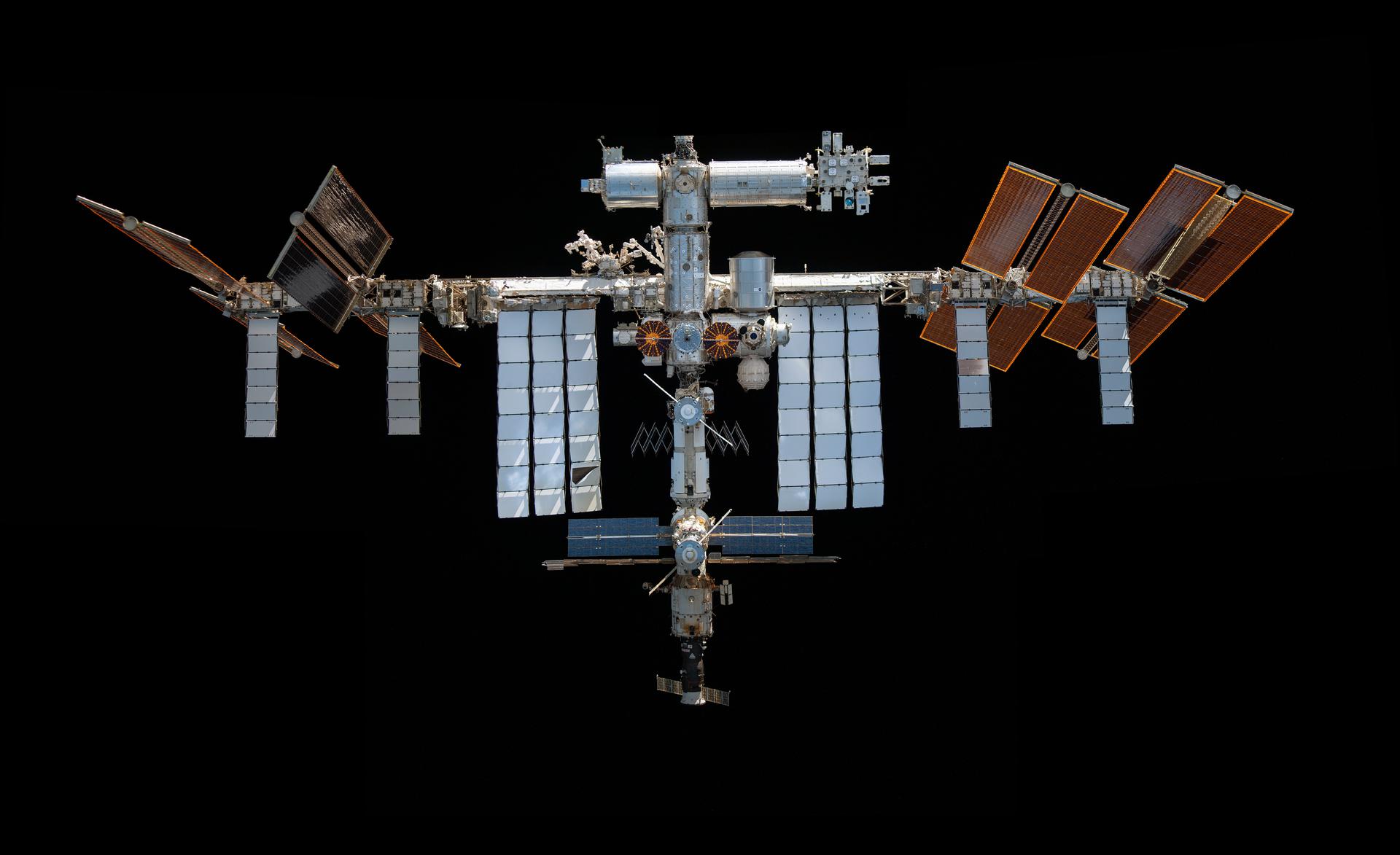
Massive radiators. In this photo[0], all of the light gray panels are thermal radiators. Note how they are nearly as large as the solar panels, which gives you an idea about the scale needed to radiate away 3-12 people's worth of heat (~1200 watts) + the heat generated by equipment.
Nemotron-3-Nano-30B-A3B[0][1] is a very impressive local model. It is good with tool calling and works great with llama.cpp/Visual Studio Code/Roo Code for local development.
It doesn't get a ton of attention on /r/LocalLLaMA but it is worth trying out, even if you have a relatively modest machine.
Deep SSMs, including the entire S4 to Mamba saga, are a very interesting alternative to transformers. In some of my genomics use cases, Mamba has been easier to train and scale over large context windows, compared to transformers.
It was good for like, one month. Qwen3 30b dominated for half a year before that, and GLM-4.7 Flash 30b took over the crown soon after Nemotron 3 Nano came out. There was basically no time period for it to shine.
It is still good, even if not the new hotness. But I understand your point.
It isn't as though GLM-4.7 Flash is significantly better, and honestly, I have had poor experiences with it (and yes, always the latest llama.cpp and the updated GGUFs).
I find the Q8 runs a bit more than twice as fast as gpt-120b since I don’t have to offload as many MoE layers, but is just about as capable if not better.
Do they have a good multilingual embedding model? Ideally, with a decent context size like 16/32K. I think Qwen has one at 32K. Even the Gemma contexts are pretty small (8K).
There have been enshitification clouds looming on the horizon for Nova Launcher for so long, I think many people (including me) were hoping it would just never happen.
That said, check out Octopi Launcher. I installed it for the first time tonight[0] and it is exactly what you are looking for - a smoother, better Nova Launcher.
Thank you! I had looked at several recommended launchers and none were real Nova Launcher replacements. I randomly saw your comment and was intrigued, especially since I hadn't seen a lot of sources mentioning Octopi Launcher as a suitable option.
It is the perfect Nova Launcher replacement. The UI and features feels like a more polished Nova and transitioning to Octopi is such an intuitive process.
I was a 10+ year long Nova Launcher user and knew this day was coming after the sale and layoffs[0][1]...
This evening I at looked several replacement launchers, such as Lawnchair and even the stock Pixel launcher again, but Octopi Launcher[2] is the more modern, more refined Nova replacement that you are looking for.
It was a very easy, natural transition process from Nova - all of the Nova features that I used were there (unlike Lawnchair), such as swipe up/down on icons to perform different actions. And little things like folder options, icon placement, and widget handling are SO much nicer on Octopi compared to Nova. Staggeringly better.
I took a screenshot of each home screen page, set Octopi as the new default launcher, and was back to my previous configuration but with a significantly improved visual appearance, in about 15 minutes. It's a no-brainer upgrade from Nova.
The Google Play install is free and basically unlimited, but there is an unobtrusive "Buy Me A Coffee" type button that allows you to donate either $1 or $3 to unlock some eye candy, which I did, but mostly just wanting to support the developer.
I opened up my phone to see about giving Octopi a shot, and (amusingly? alarmingly?) Nova Launcher produced a popup warning me that it would now feature ads.
Anyway, my launcher needs are pretty minimal. Switching over and recreating a familiar layout was easy enough.
I do find one function missing, though: Some shortcut functionality seems missing in Octopi that was present in Nova.
For instance: Shazam. I use it to identify the music I hear, and that's all I want it for. With Nova, I was able to create a single-tap button on the home screen for a "Shazam Now" shortcut that immediately went straight to the identification phase with zero nonsense. This worked slick, and I'd been using it this way for a decade or so.
With Octopi, I can long-press the Shazam icon and pick "Shazam Now", and that does work. But that's multiple steps instead of just one, and I can't drag that shortcut to the home screen. There is also a list of apps with shortcuts that I can add, but Shazam is missing from that list.
Thus, the single-tap Shazam Now function I'm familiar with is presently lacking. Perhaps some day. :)
(Otherwise, Octopi fits with everything else I want to do, so I'm buying the dev a coffee.)
You can use the open source app Activity Launcher to create homescreen shortcuts to directly launch any exposed activity/method in any app. There's probably a StartSongSearch or similar activity in Shazam. (there's also a song search activity in the Google app)
I managed to add a Shazam Now button using a Shazam widget, not a shortcut. Give it a try!
I just installed Octopi on this thread's recommendation. Pretty good so far, and I'm happy to remove the useless Google search bar from the bottom of my Pixel (I use Kagi and Firefox, neither of which can be configured on that bar). Also satisfied how you can resize widgets to any size, regardless of what the widget asks for.
That's similar functionality, but it's not a Shazam Now shortcut. I really don't want any widgets -- at all, ever. And I need labels -- remembering arbitrary iconography is a silly task when phonetic written language exists.
Just a shortcut is fine. Or at least: It had been fine for nearly a decade.
(Besides, Shazam is just a singular example. I had other shortcuts that I also used. I'm really rather disinterested in finding individual workarounds for each of them.)
As an unfortunate reply to myself, I'd like to ask a question to nobody in particular: Do y'all not use shortcuts? I think that they are pretty neat, and we've had them on Android since around version 7.1.
And the reason I ask this is because when I Google up different combinations of nouns, verbs and word usements for my problem of Android shortcuts and Octipi Launcher, I fairly-consistently find my own recent comments on HN (above, in these threads; within the bounds of this posting) in the top 5 results.
And that tells me that I am not only preaching to the choir, but the choir only exists of one member. And that member is me.
So I guess I am thus preaching to myself.
Awesome!
And thus, perhaps I am much more of an outlier than I ever imagined.
So the question stands: Am I really looking in from the outside with my quest for Android shortcuts that we've had for almost a decade? Is this lack of functionality really a thing that others just simply don't notice in a modern Android ecosphere? Is it a forgotten relic of the past?
(Whatever the case, it presently doesn't work with Octopi Launcher -- and I'm going to keep using it anyway.)
I do use shortcuts, even with Octopi. WhatsApp has shortcuts to chat with specific contacts, and Termux has shortcuts to arbitrary snippets, and I love both. I mentioned the Shazam widget only because it seemed to have the exact same functionality, only lacking the label.
A widget is a thing that runs. It's an active process with a channel to create its own on-screen display, and the mere existence of it consumes non-zero CPU even if never invoked.
A shortcut is more like an icon on a Windows desktop, or perhaps a unix symlink. If it is never used, then it never really does anything at all.
Anyhow, Octopi. It does support shortcuts, but it seems like there's two different pathways for them and they do not work the same at all.
One pathway: Long-press the wallpaper and there's a list of them a tap or two away for some apps and it's easy to add them to the home screen. Home Assistant is in this list, but Shazam is not.
The other pathway: Long-press an app icon and a list of named shortcuts may appear. These are impossible to link to a home screen icon. And the per-app behavior is opposite: Long-pressing Home Assistant does not present this list, while long-pressing Shazam does.
What a coincidence of shitholery here.
I've been a very loyal user of Nova for almost a decade now, and I have never even thought of using any other launcher. Now, strangely since 2 weeks ago, on my Samsung phone, I've been experiencing a lot of freezing and random crapping out of my Nova launcher, where it would just not let me do anything and show a blank home screen with a wallpaper. So this most likely is the reason, I'm not sure, but this sends a very bad vibe down the line now.
I am going to look for a nice open source launcher and get used to it. To hell with the shittification of our beloved apps and services.
that same moment I switched to Niagara launcher. After 10 minutes of using it bought the Pro level and that was it. I kept around 5 apps in main screen, YT music widget automatically pops up on top when I connect headphones. The side scroll is very well thought out. For each letter the most used apps are on top. This one clicked with me.
I tried Niagara myself, but that's not for me. I need more than one widget, very different weather widget, and quick access to the full drawer.
Separately it openly states in the privacy policy it states your location with third parties (or at least did 2 months ago). Big GTFO from me at this point.
I also tried and loved Kvaesito, but sadly their strict "one widget per line" limitation is where I bailed out. I use a number of 1x1 and 1x2 widgets so this basically breaks it down for me.
"In-app purchases" another annoyance of the play store, can't see prices without installing an app.
So question for users of Octopi, how's the pricing?
1. It's not unique to the play store, as a matter of fact, this started in the iOS app store and was "adopted" by Google. It could definitely be improved though, i.e. if all potential in-app purchases were listable via the store page, like on steam for example
2. The prices were mentioned in the comment you're responding to.
Where? Just checked on every app I've purchased in app unlocks and none of them have any indicator for these unlocks (or others that are still available) on their app store page.
The only way to see them - from my experience which I just verified - is to go into the app and go into the relevant menu's of the apps.
Please explain where you're able to see this information on the app store on iOS or iPadOS
Is this maybe only available for some regions or opt-in for the developer? I this UX doesn't exist on my devices running on 26.2 in the apps I checked. I just verified again but no luck
/Edit: found it! that is way too hidden - Would never have found that without your explicit mention and gif link!
After exploring some more on the play store too, There is actually a similar UI in the app details there too, it doesn't list all items but the price range (cheapest item to most expensive item). Definitely worse then having all items listed, but both could be improved imo by listing them as repeatable purchases, temporary licenses, forever unlocked etc) for informed consent before install. I'd never install any app which has repeatable transactions for example
What seems to be missing from every alternative I've seen is the power offered by the combo Nova+Sesame. I really don't use my launcher as a navigation system. All it does for me is pop open a search box after a swipe so I can type the name of the app I want to use, the contact I want to text or call, etc.
There seem to be other "search-first" launchers out there (KISS is one), but then they miss the amount of expected polish (unread/notification badges, leeway in letting you place random widgets on the background, etc). Still searching.
As another 10+ year Nova Launcher user, I appreciate this. I bought prime forever ago (3x actually as I moved domains), I'll happily use Octopi on my tablet. Thanks again!
I've spent about 10 mins seeing if I can replicate my Nova setup with Octopi. My only missing feature so far is more extensive gesture support. As far as I can tell, Octopi supports a max of five actions, and you can't change the gestures for them. They seem to be hardcoded to "swipe up", "swipe down", "swipe right from first screen", "double tap" and "tap home (icon)". If I could change the gesture for "swipe right from first screen" and "double tap" then I could almost perfectly recreate my Nova setup.
It's these discussions where I realize people use phones in such different ways.
I abandoned Nova last year when I read about this looming problem. I found that Fossify Launcher beta (from F-Droid) works well enough for me on my Pixel 8a.
I don't really need much out of a launcher. My main goal was to have one like my older Android and not be forced to have a search bar or assistant triggers on my home screen.
All I need from the home screen is to be able to place basic widgets like clock and calendar and shortcuts for the basic apps I use frequently. A plain app drawer is fine for the rest, because I don't really install that many apps and instead disable/remove many. My app drawer shows 35 apps and has several blank rows remaining on the first page with 5 icons per row.
I liked it, but when I added a 4x1 widget (meteoblue forecast), that didn’t properly resize to the size available. Wasn’t a problem for Hyperion or Nova, was worse for Lawnchair.
Widget sizing/appearance was probably the only surprise that I discovered between Nova and Octo. Resizing in Octo takes a bit of getting used to, but I was able to reproduce the appearance of all of my widgets.
Padding is a little different and harder to discover than Nova - it is in the "Customize appearance" menu when you long tap on a widget. That is something to check out, as well as making sure Rounded Corners aren't enabled.
There is also a "Freely position and resize items" option in the Launcher Settings->Home tab, which I do not have enabled, but might be necessary to get your widget sizing just right?
Yeah, tried all of that, but none of the options work. Funnily enough with free resizing it looks right for a moment, then changes to being too big again.
I’ll certainly not exclude this being a meteoblue issue (I only use two widgets, digical and meteoblue), but Hyperion (only with 6 columns) and Nova (always) get it right.
I had never experienced meteoblue so I installed it, it looked very nice, but when I added the 4x1 widget, it looked horrible. I resized it and got "Subscription required. Tap on the widget to open the in-app store"!
If you're in the US, I like NOAA Weather Unofficial[0]. It is not quite as visually impressive as meteoblue, but has good technical details and the 4x2 widget resized exactly like I wanted. I think the free version is unrestricted, but it is another app where I explicitly wanted to support the developer.
I tried some of these and decided on Smart Launcher [0] espescially because they had an "import settings from Nova" feature. AND their search is amazing--with a single search it looks at contacts, web search, apps, etc.
Thank you for this!
I was really happy with one launcher that I configured probably 8-9 years ago and then moving to the new phone meant everything just worked (^tm ?) with normal phone porting.
Reading the headline made me freak out for 2 min. I really really do not like UI muscle memory being changed for something like my phone.
What is your experience from a performance perspective? Nova Launcher was pretty light on that front, I'm using smart launcher since a few months and it is ok but Nova was lighter.
I only have one day's worth of light usage on a Pixel 9 Pro, but it feels at least as responsive as Nova Launcher.
Zero lag in switching screens, opening the app drawer, or scrolling through apps - there is a control for the animation speed, but it doesn't seem to really have any impact, positive or negative.
Meh. I installed Octopi, but it's like death by a thousand cuts. The dock looks like hot garbage when you flip to landscape mode--it ends up taking up like 60% of the screen. I don't know why it doesn't just switch to vertical mode the way Nova did.
Lack of being able to name the folders is also an annoyance, as is the way the folder icons pop out to the side from the dock rather than up-and-over.
This feels like the desperate, look at me! post, which is the exact opposite of Andrej Karpathy's recent tweet[0] about feeling left behind as a programmer, as covered on Hacker News[1].
I guess would want to see how sustainable this 5 parallel AI effort is, and are there demonstrably positive outcomes. There are plenty of "I one-shotted this" examples of something that already (mostly) existed, which are very impressive in their own right, but I haven't seen a lot of truly novel creations.
I wonder what sort of problems you must have to get this upset about the creator of a particular software telling people how they personally use that software
Personally I keep open several tabs of CC but it's not often that more than one or two of them would be running at the same time. It's just to keep particular context around for different parts of the same application since it's quite big (I don't use CC for creating new projects). For example if I had it work on a feature and then I realized there was a bug or an adjustment in the same files that needed to be made then I can just go back to that tab hours or maybe even days later without digging through history
> I assume "what sort of problems you must have" was directed at me.
I don't really have any sort of personal problem with Boris' post, if what your inflammatory statement was implying.
I also think it was a fairly good description of his workflow, technically speaking, but also glosses over the actual monetary costs of what he is doing, and also as noted above, doesn't really describe the actual outcomes other than a lot of PRs.



I have some experience doing this with this on an older keyboard Kindle and Calibre, and haven't really kept up with the current state of jailbreaking on newer models, but at the time, it wasn't possible. Although a quick search says that you can still deDRM books using the desktop app[0].
[0] https://techy-notes.com/remove-drm-from-kindle-ebooks/
reply